
How to Change The Default Application In macOS
In macOS each file type is opened automatically by a default application. This short blog post will explain how you can change the default application a file opens with.


Unsure how long your Mac has been running for before its last reboot? Wanting to see a list of recent reboot dates for diagnostic purposes? There are a couple of useful Terminal commands that can help with this.
In Terminal, type or paste the following…
uptime
(return)
The following information will then be displayed…
Current time;
Amount of days and hours the Mac has been on since it was last rebooted;
Number of users;
Central Processing Unit (CPU) load averages.
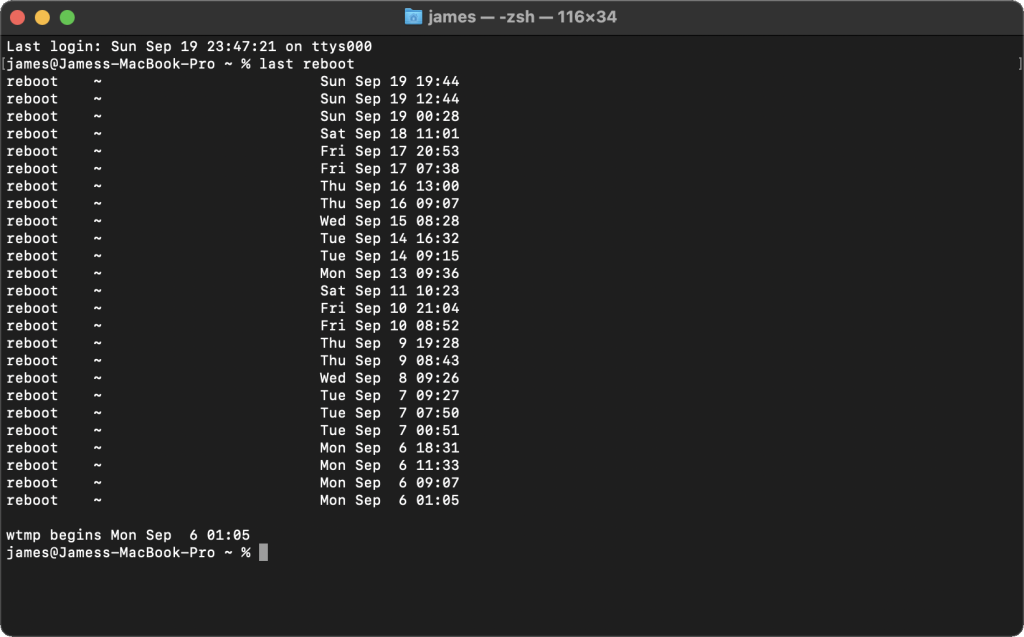
In Terminal, type or paste the following…
last reboot
(return)
A list of dates will appear on screen showing each time the Mac has restarted.
The day, month, date and time of each reboot is displayed.
Originally posted 27 April, 2025.
In macOS each file type is opened automatically by a default application. This short blog post will explain how you can change the default application a file opens with.
Whereas it is a standard feature to rename an individual file, since MacOS X Yosemite (10.10), it has also been possible to rename groups of files at the same time.

When you have multiple applications open at once there are several ways you can switch between these applications efficiently.